Track
Time tracking your team won't dodge.
A weekly grid for the hours you know. Timers for the work happening now. A preview before natural-language entries become billable time.
Manual agency approval · No subscription
Track
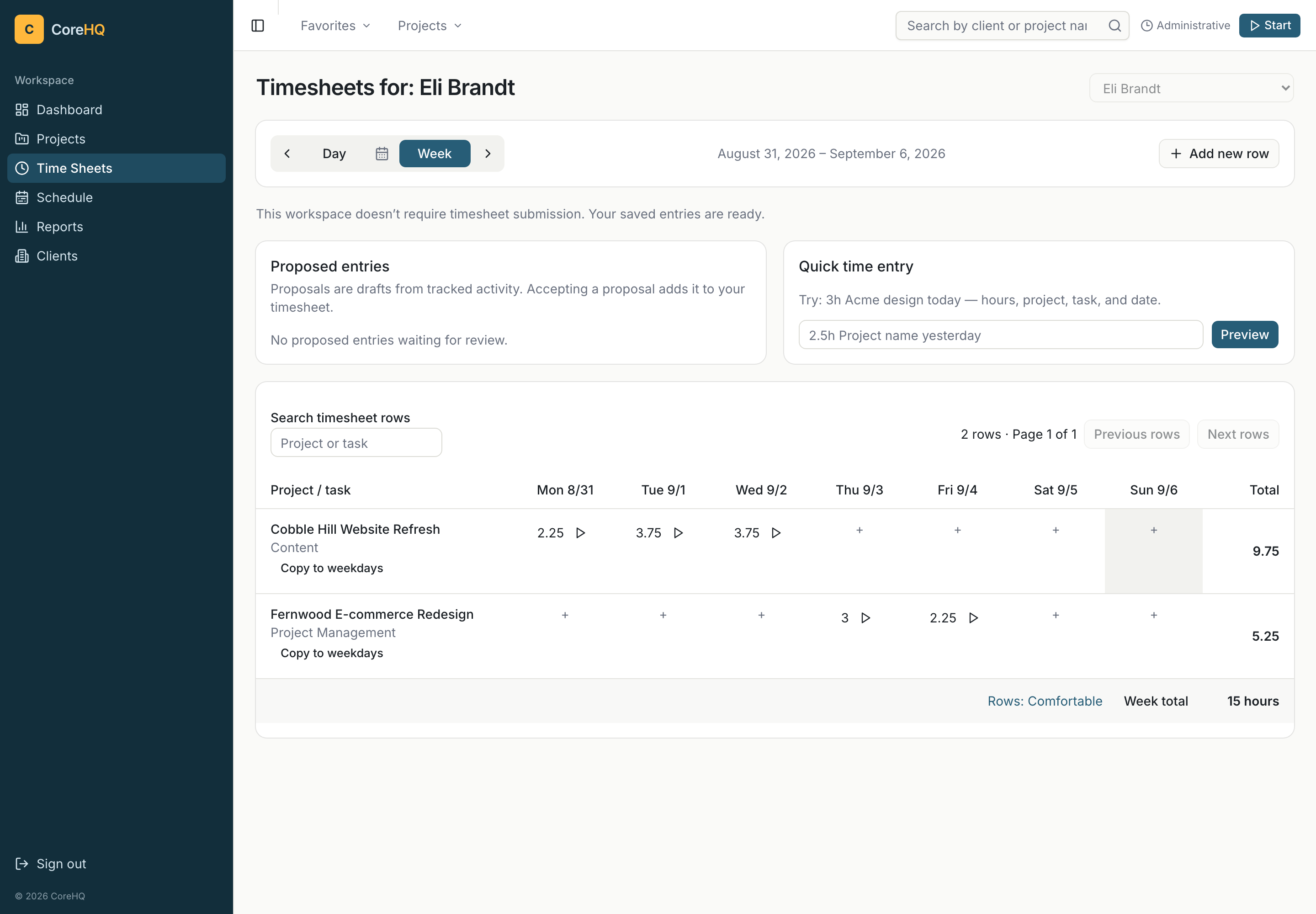
A week of work, in one grid.
- Add hours directly in day cells. Copy an entry across the week without reopening the full form.
- Keep entry focused with bounded inputs and project and category filters.
- Start timers from task rows or the global picker. Choose the project and billing category explicitly.
TrackIncluded
Say it. Review it. Save it.
- Type an entry such as “3h Fernwood design today.” Check the resolved project, category, hours, and date before confirming.
- Review time proposals from tracked activity. Approve or dismiss them Included
- Turn on timesheet approvals when your workflow needs review. Approvals are optional Included

Track / Get Paid
Save the hours. Keep their rates.
Billing rates snapshot when time is entered. Changing a rate later does not rewrite the rates on earlier entries, keeping the basis of past invoices stable.
A save acknowledgement confirms the project and time you just recorded.

Bring your history
Map your time CSV.
Import existing time with columns for client, project, task, date, hours, and notes. Review the column mapping before importing.
Download a sample time CSV →In imports and time entry, “task” is the billing category; delivery tasks live on the project board.